一条多出 8dp 的分割线
文章目录
没想到 2026 年了还能来一场酣畅淋漓的 Android bug 问题排查
一个平平无奇的布局
假设现在有以下 Android 布局:
<?xml version="1.0" encoding="utf-8"?>
<LinearLayout xmlns:android="http://schemas.android.com/apk/res/android"
    android:layout_width="match_parent"
    android:layout_height="wrap_content"
    android:gravity="center_horizontal"
    android:orientation="vertical">

    <View
        android:layout_width="match_parent"
        android:layout_height="40dp"
        android:layout_marginStart="16dp"
        android:layout_marginEnd="16dp"
        android:background="#CCCCCC" />

    <View
        android:layout_width="match_parent"
        android:layout_height="40dp"
        android:layout_marginStart="16dp"
        android:layout_marginEnd="16dp"
        android:background="#CCCCCC" />

</LinearLayout>
其看起来类似这样:
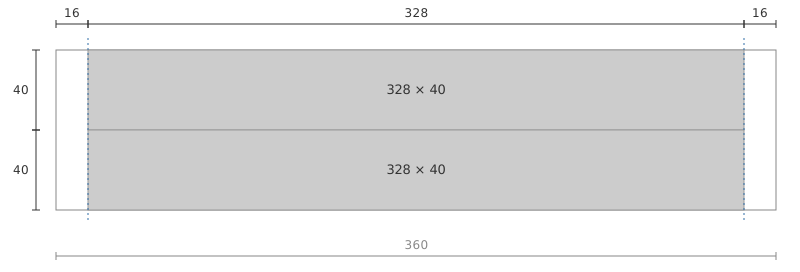
现在需要为两个元素间增加一个分割线,要求左侧留 16dp 空间,右侧不留:
<?xml version="1.0" encoding="utf-8"?>
<LinearLayout xmlns:android="http://schemas.android.com/apk/res/android"
    android:layout_width="match_parent"
    android:layout_height="wrap_content"
    android:gravity="center_horizontal"
    android:orientation="vertical">

    <View
        android:layout_width="match_parent"
        android:layout_height="40dp"
        android:layout_marginStart="16dp"
        android:layout_marginEnd="16dp"
        android:background="#CCCCCC" />

    <View
        android:layout_width="match_parent"
        android:layout_height="1dp"
        android:layout_marginStart="16dp"
        android:background="#C8452D" />

    <View
        android:layout_width="match_parent"
        android:layout_height="40dp"
        android:layout_marginStart="16dp"
        android:layout_marginEnd="16dp"
        android:background="#CCCCCC" />

</LinearLayout>
代码看起来一切正常,但是等等……怎么跟想象中不太一样:
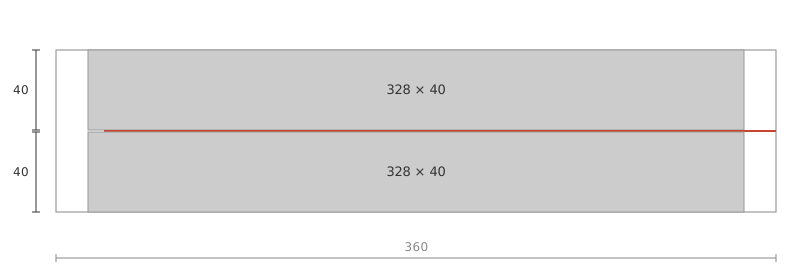
感觉像是尺寸被 x1.5 了,尝试将 16dp / 1.5:
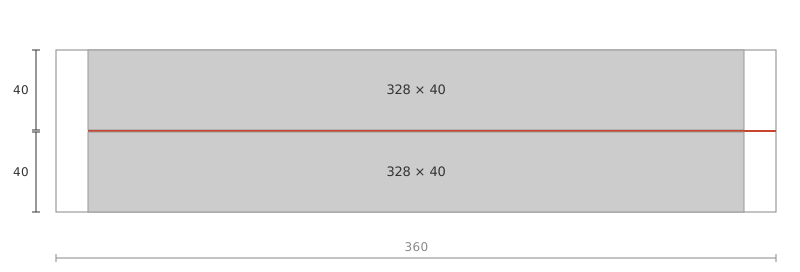
还真是,不过为什么会这样呢?
细心的朋友已经发现了
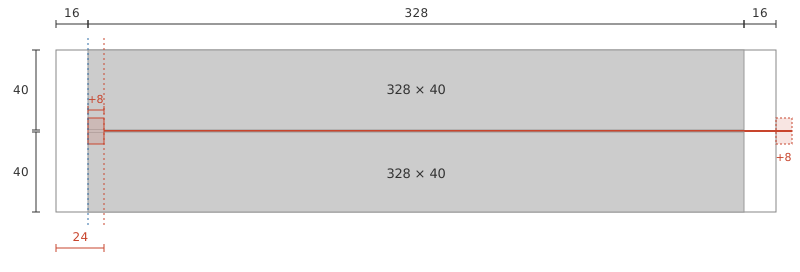
我们的父布局是 LinearLayout,而其设置了 android:gravity="center_horizontal",因此我们的分割线实际是这样:
翻一翻 LinearLayout 的源码可以发现,竖直方向 LinearLayout 的 layoutVertical() 里,居中分支是:
childLeft = paddingLeft + ((childSpace - childWidth) / 2)
+ lp.leftMargin - lp.rightMargin;说白了,center_horizontal 是在「已经扣掉 margin 的宽度」上居中的,居中之后又把 marginStart 加回来,margin 等于被算了两次。
子 View 测得宽度 ,居中位移是 ,再加上 , 就成了 。
这就是「看起来 1.5 倍」的来源,而且它只在子 View 宽度为 match_parent 且父容器 center_horizontal 时出现。
一般情况
把上面的推导写成一般形式:
三种 margin 组合分别对应三种结果:
| margin_start | margin_end | getLeft() | 结果 |
|---|---|---|---|
| 对齐,正常 | |||
| 多出 | |||
| 越出左边界 |
偏移量只和左右 margin 的差有关:
移除后恢复正常
移除 center_horizontal 之后,分割线才回到该在的位置:
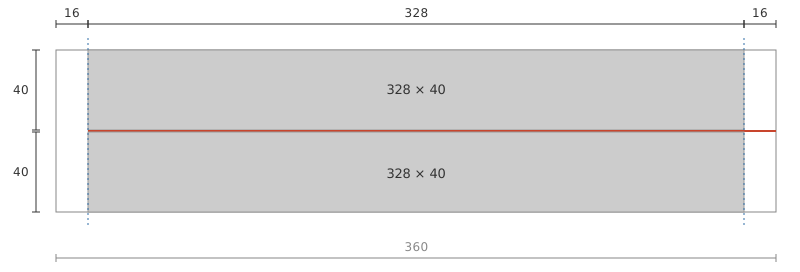
若父布局里的其它子 View 还要靠 center_horizontal 居中,也可以只给分割线 View 设置 layout_gravity=start
什么?为什么分割线要只左边留白右边不留?那只是忠实还原设计稿罢了
评论
还没有留言,欢迎分享你的想法。
写下你的留言
填写即同意接收本条留言的审核通过和回复通知。邮箱仅用于通知,以加密形式保存,不会公开展示。
提交时使用 Cloudflare Turnstile 验证以减少垃圾评论。留言通过邮件送交审核,通过后随网站更新显示。支持纯文本,请勿填写隐私信息。
草稿(含昵称和邮箱)仅保存在此浏览器,提交成功后清除。